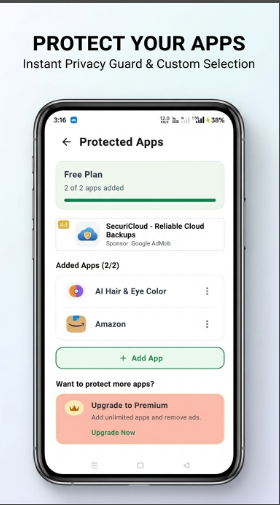
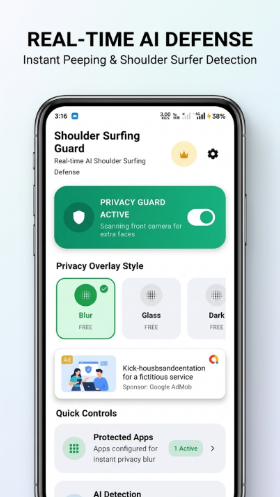
**Privacy Guard: Anti Peeping** helps protect your screen from unwanted peeking and shoulder surfing when you use your phone in public or around other people.
Whether you're on public transport, at a café, in an office, or simply using your phone around others, Privacy Guard is designed to alert you when someone may be looking at your screen.
### 🛡️ Key Features
* **Anti-Peeping Protection** — Helps detect people who may be viewing your screen.
* **Shoulder Surfing Alerts** — Get an alert when suspicious viewing is detected.
* **Privacy Protection** — Stay more confident while using private apps and information in public.
* **Quick Privacy Mode** — Easily turn protection on or off when you need it.
* **Smart Detection** — Uses on-device camera-based detection to identify potential viewers.
* **Designed for Everyday Privacy** — Useful in offices, cafés, airports, public transport, and other crowded places.
Privacy Guard: Anti Peeping is designed to provide an additional layer of privacy while you use your smartphone around other people.
**Your screen. Your privacy. Stay protected from prying eyes.**
Testing Instructions
1. Open the app and complete the initial setup.
2. Grant all requested permissions, including **Camera** and **Overlay** permissions.
3. Add at least one app to the **Protected Apps** list.
4. Make sure **Protection is enabled** before testing.
5. Open the selected protected app.
6. Have another person position themselves within the camera's detection range and look toward the phone screen.
7. Move the person closer or farther away and change their viewing angle to test different scenarios.
8. Verify that the app detects a potential viewer and **displays the privacy alert as an overlay on top of the protected app's screen**..
9. Test switching between protected and unprotected apps to verify that protection only activates for apps added to the **Protected Apps** list.
10. Test enabling and disabling protection using the available toggle.
11. Test under different lighting conditions and environments.
**Important:** The app must have **Overlay permission enabled**, the **Protection feature enabled**, and the app being tested must be added to the **Protected Apps** list.
**Privacy:** The camera is used for detecting potential viewers and is not intended to record or store camera footage.
Screenshots
Tap a screenshot to view it full size.